Multi-sample analysis: three-sample analysis of yeast mutants and their parent strain
Background:
Wild-type laboratory strains of Saccharomyces cerevisiae , like the reference strain S288C or the widely used strain CEN.PK113-7D, can grow on a variety of carbon sources including lactate.
In a recent publication [2], a knock-out mutant strain based on CEN.PK113-7D was generated, in which the gene for the only known lactate transporter in yeast, JEN1, is disrupted by an inserted reporter cassette. As expected this strain cannot use lactate as a carbon source. Laboratory evolution was used then on this strain to obtain two substrains that had regained the ability to grow on lactate. Both substrains, IMW004 and IMW005, were subjected to WGS to gain insight into the genomic changes that these strains had undergone compared to CEN.PK113-7D over ~100 generations of laboratory evolution and that might explain their ability to grow on lactate despite the disruption of the JEN1 gene.
Strikingly, the substrains harbored independent point mutations in the acetate transporter gene ADY2 and subsequent experiments showed that these mutations are likely to cause changes in the substrate specificity of this transporter.
This example uses MiModD to recapitulate the primary finding from the laboratory evolution experiment. It will demonstrate how MiModD enables the simultaneous analysis of several samples in a few simple steps, and how the data exploration and annotation tools can be used to narrow down large lists of variants and affected genes efficiently.
The yeastADY2.tar.gz archive available from the MiModD download site contains the following files:
- the S288C reference sequence in fasta format,
- a BAM file of NGS reads from the CEN.PK113-7D parent strain (the reads are a random subset of those available through the NCBI small reads archive (SRA) under accession number SRX129922),
- a BAM file of NGS reads from the lab-evolved substrain IMW004 (the same reads as available under the NCBI SRA accession number SRX129995), and
- a BAM file of NGS reads from the lab-evolved substrain IMW005 (the same reads as available under the NCBI SRA accession number SRX129996).
Step 0: Preparing the data
Data preparation for Galaxy
If you are using MiModD through its Galaxy interface, you need to upload the reference fasta and the BAM files of WGS reads to Galaxy just as in the first example. Once the uploads are finished you can proceed to Step 1.
Data preparation for the command line
Besides extracting the data files from the downloaded archive no special data preparation is required when working from the command line. As in the first example, we will assume though that you have set your current working directory to the extracted directory tutorial_ex2. Although this is not an absolute requirement, it will allow you to execute the command line instructions in this section by simply copying/pasting them from this page into a terminal window.
Step 1: Multi-sample NGS Reads Alignment with the MiModD snap tool
Alignments for multiple samples are almost as simple to perform with MiModD as alignments for a single sample.
In Galaxy, start by selecting the reference genome and the first sequenced reads input file. Select paired-end as the mode for this file since all WGS data in this example was obtained using Illumina paired-end sequencing. Select BAM as the input file format. As before, you do not have to select a custom header file since all BAM files in this example have appropriate header information already. Once you have configured these settings for the first input file, simply add the additional input datasets. You can add a dataset by clicking on the Add new datasets button.
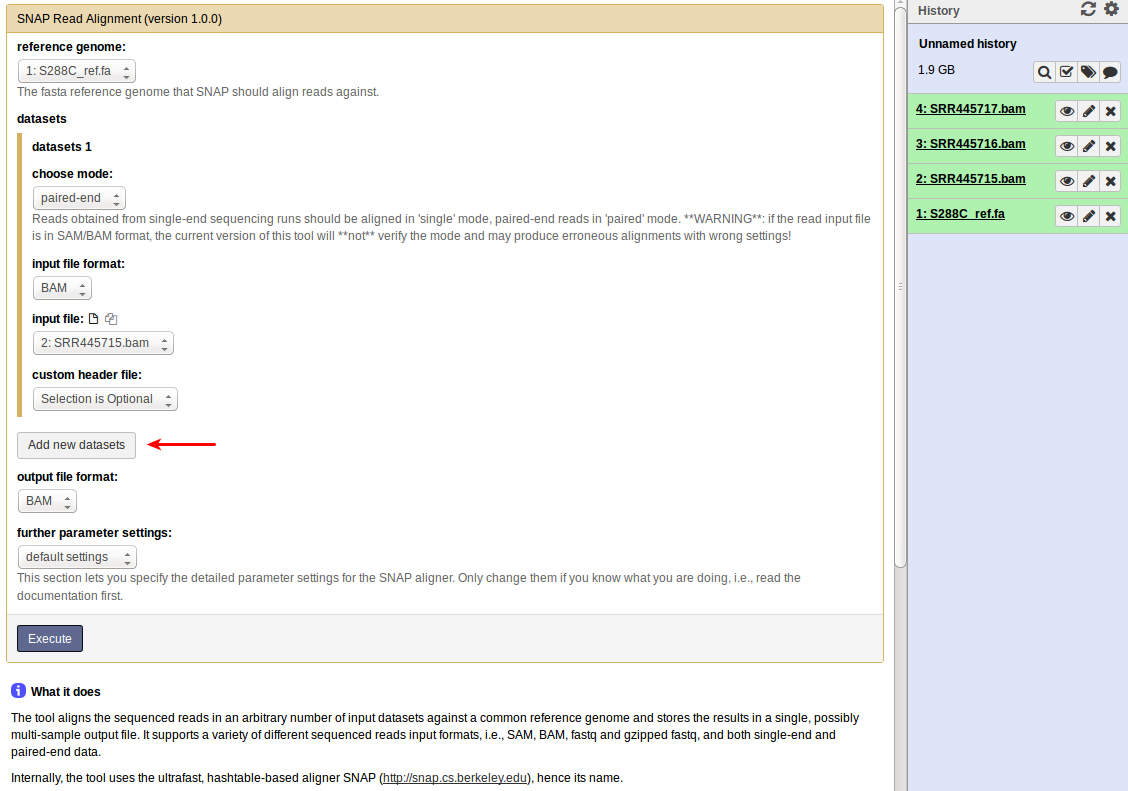
Make sure you select the appropriate mode (paired-end) and file format (BAM) for each dataset.
Leave the output file format and the further parameter settings unchanged and click on Execute to start the analysis job.
This will add a single results file with the merged alignments for all input files to your history.
If you are using MiModD from the command line, you will have to use the snap-batch tool to align reads from multiple input files. To this tool you have to pass a full valid snap tool call per input file, either as a series of literal commands or as a text file, in which the individual commands are stored on separate lines.
If this sounds complicated, consider this example:
To perform the alignment for just one input file you would issue the following command as we have seen in the First Steps example , e.g.:
mimodd snap paired S288C_ref.fa SRR445715.bam -o SRR445715.aln.bam --verbose --quiet
The command line to execute snap-batch for an alignment of all three BAM input files with the same settings as above then takes the following form:
mimodd snap-batch -s "snap paired S288C_ref.fa SRR445715.bam -o example2.aln.bam --verbose --quiet" "snap paired S288C_ref.fa SRR445716.bam -o example2.aln.bam --verbose --quiet" "snap paired S288C_ref.fa SRR445717.bam -o example2.aln.bam --verbose --quiet"
Here, the snap-batch -s switch indicates that the individual snap calls are
specified directly on the command line. Note that the quotes around the
individual snap calls are necessary to group the calls (or the shell would
split arguments on every whitespace).
Alternatively, you can generate a batch text file (using any editor that lets you store or export plain text) with the following content:
snap paired S288C_ref.fa SRR445715.bam -o example2.aln.bam --verbose --quiet
snap paired S288C_ref.fa SRR445716.bam -o example2.aln.bam --verbose --quiet
snap paired S288C_ref.fa SRR445717.bam -o example2.aln.bam --verbose --quiet
and then call snap-batch like this (the -f switch tells the tool to read
the snap commands from the specified file):
mimodd snap-batch -f <batch file>
Note
In both versions of the snap-batch command you need to provide the -o
switch with every single snap command just to form a valid call. Since
snap-batch will always produce just a single merged output, it takes the
output file name from the first snap command that is provided and ignores
additional output file specifications in later commands.
See also the snap-batch tool description in the Tool Documentation.
Step 2: Identification of Sequence Variants from a multi-sample alignment
Variant calling from a multi-sample alignment as input is really no different from the single-sample procedure illustrated in the first example.
MiModD will correctly identify read groups and samples present in the input file of aligned reads and handle them appropriately.
We leave it up to you to run this very simple job from Galaxy, but here is the command line equivalent to copy/paste:
mimodd varcall S288C_ref.fa example2.aln.bam -o example2_calls.bcf --quiet --verbose
Step 3: Identification of Deletions
Like for Variant Calling, there is no difference between the Deletion Calling step for single-sample and multi-sample input.
Again, MiModD will auto-detect all read groups and samples in the input file and handle them appropriately. The result is a single output file, in which deletions (and possibly uncovered regions) are reported along with the sample in which they were detected.
From the command line you can use delcall with:
mimodd delcall example2.aln.bam example2_calls.bcf -o example2_deletions.txt --max-cov 4 --min-size 100
Step 4: Data Exploration and Annotation
Preliminary Note
The real difference between a single-sample WGS analysis and the analysis of multiple samples is that multi-sample data allows more complex questions to be addressed than single-sample data.
Possible questions in this example are:
- What differences exist between the parent strain of the study, CEN.PK113-7D, and the reference strain S288C ?
- What differences exist between the evolved strain IMW004 and its parent CEN.PK113-7D ?
- What differences exist between the second evolved strain IMW005 and its parent CEN.PK113-7D ?
- Are there common effects of these differences in IMW004 and IMW005 ?
Note that question 1 is only of secondary interest here compared to questions 2 and 3, but most importantly, that the naive question
What differences exist between each of the evolved strains and the reference ?
is not very helpful since the set of these differences will be the union of the differences between CEN.PK113-7D and S288C and the differences between each evolved strain and CEN.PK113-7D. In fact, this is the reason why it is essential to include sequencing data for CEN.PK113-7D in the analysis.
Also note that in question 4) we are not asking for shared differences in IMW004 and IMW005. Since these two strains have evolved completely separately the chance of them sharing an exactly identical variation that is not present in their parent strain is extremely low. However, it is certainly possible that different variants in the two strains will affect the same genomic feature (e.g., the same gene), which could be taken as evidence that this gene may be of importance for the observed biological effect (i.e., growth on lactate).
To begin with, we need to extract the total set of variants detected in the variant calling step. From the command line this is done through:
mimodd varextract example2_calls.bcf -o example2_extracted_variants.vcf
Again, we leave it up to you to do the same from Galaxy.
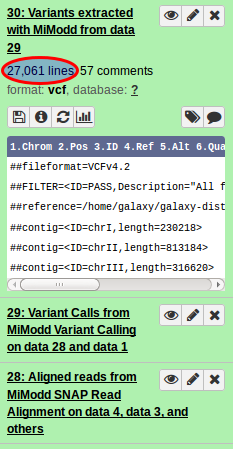
A quick look at the results reveals that, in total, over 27000 (!) variants (SNVs and indels) have been detected (see figure on the left).
These include differences between any of the three sequenced samples and the reference genome along with false-positive calls. The goal of this analysis step is to filter and annotate this impressive list in different ways to remove false-positive variants and to retain only those that help us answer the four questions defined above.
This section demonstrates how the vcf-filter and the annotate tool can be used together for this purpose.
Note
In principle, deletions predicted in the Deletion Calling step should be treated the same way, preferably together with the other variants. The current version of MiModD, however, does not offer any tools to post-process the deletion output file. Luckily, the number of predicted deletions is typically much smaller than that of other variants, so inspecting the full list of deletions is possible (though, admittedly, inconvenient).
Q1: Differences between the parent strain of the study, CEN.PK113-7D, and the reference strain S288C
The key to answering most of our questions is to use the vcf-filter tool with appropriate sample-specific filters.
A simple filter corresponding to question 1 can be formulated on the command line as:
mimodd vcf-filter example2_extracted_variants.vcf -o example2_q1_filter1_variants.vcf -s CEN.PK113-7D --gt 1/1,0/1 --dp 0 --gq 0
, which reports all variants for which the CEN.PK113-7D sample appears to be heterozygous or homozygous mutant. With this approach we get rid of more than 1000 variants, but are still left with over 25000.
It is quite easy, however, to make the filter more stringent, e.g., we can try:
mimodd vcf-filter example2_extracted_variants.vcf -o example2_q1_filter2_variants.vcf -s CEN.PK113-7D --gt 1/1,0/1 --dp 3 --gq 0
, which is very similar to the first version but, in addition, is asking for at least three fold coverage of the variant for the CEN.PK113-7D sample. Adding this new criterium, leaves us with just below 25000 variants.
CEN.PK113-7D is a haploid yeast strain and heterozygous calls are likely indicating sites at which variant calling is unreliable, so there is justification (as discussed for the first example) for using:
mimodd vcf-filter example2_extracted_variants.vcf -o example2_q1_filter3_variants.vcf -s CEN.PK113-7D --gt 1/1 --dp 3 --gq 0
to retain only homozygous variants, which turn out to be ~ 23500 in our case.
Finally, we could reason that true sequence deviations between CEN.PK113-7D and the reference strain S288C are very likely to occur also in the derived strains IMW004 and IMW005. Thus, we can add additional filters for these samples resulting in:
mimodd vcf-filter example2_extracted_variants.vcf -o example2_q1_filter4_variants.vcf -s CEN.PK113-7D IMW004 IMW005 --gt 1/1 1/1 1/1 --dp 3 3 3 --gq 0 0 0
, which only retains variants for which all three sequenced samples appear to be homozygous mutant and for which there is an at least 3-fold coverage in all three samples. Applying this filter gives us a list of ~ 22500 variants representing our best candidates for true variant sites between S288C and CEN.PK113-7D.
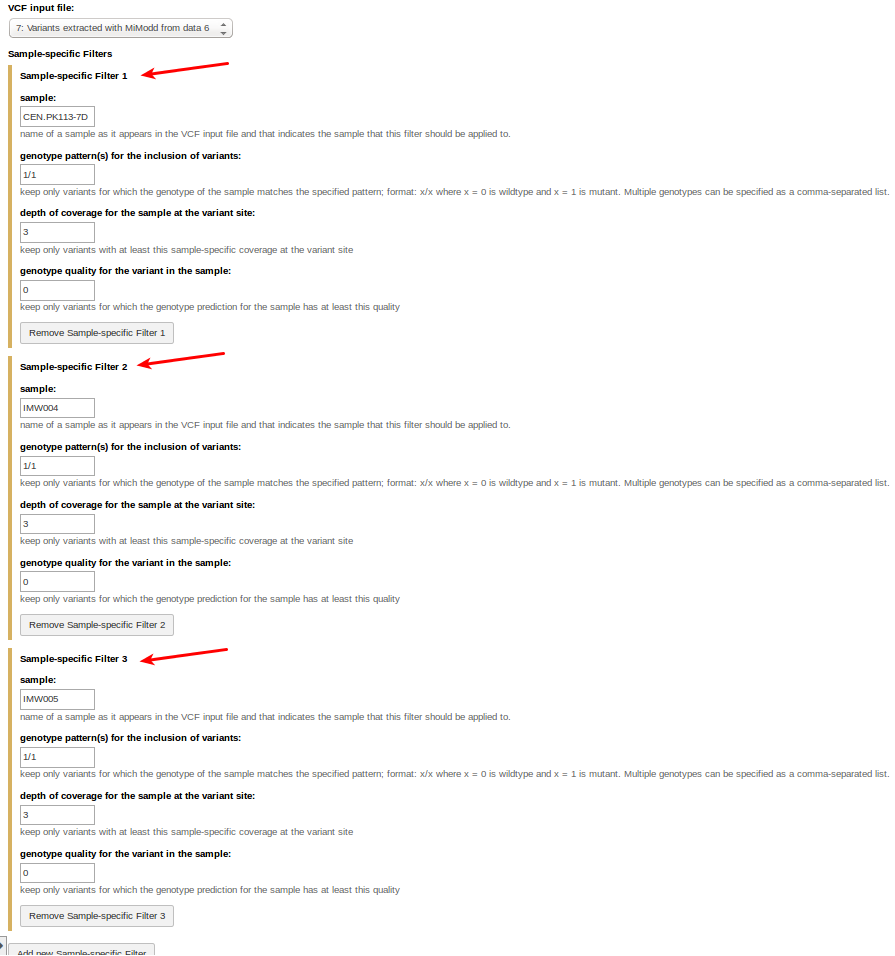
To compose this last job from Galaxy, open the VCF Filter tool, select the VCF input file, then define three sample-specific filters (adding them by clicking on Add new sample-specific filter) as shown below:
Q2: Differences between the evolved strain IMW004 and its parent CEN.PK113-7D
Here we are looking for variants in IMW004 that are not present in the parent strain CEN.PK113-7D. To get them we can use:
mimodd vcf-filter example2_extracted_variants.vcf -o example2_q2_variants.vcf -s CEN.PK113-7D IMW004 IMW005 --gt 0/0 1/1 0/0 --dp 3 3 3 --gq 0 0 0
The rationale for including IMW005 in this filter and only accepting variants that are absent from this strain is that the laboratory evolution experiment was not started with CEN.PK113-7D, but with a derived strain genetically engineered to have the JEN1 gene disrupted. The sequence of this strain is not available, and the idea is that variants found in IMW004 and IMW005, but not CEN.PK113-7D, must have first occurred in the unsequenced JEN1delta strain and, thus, were present at the start of the experiment, which makes them less interesting.
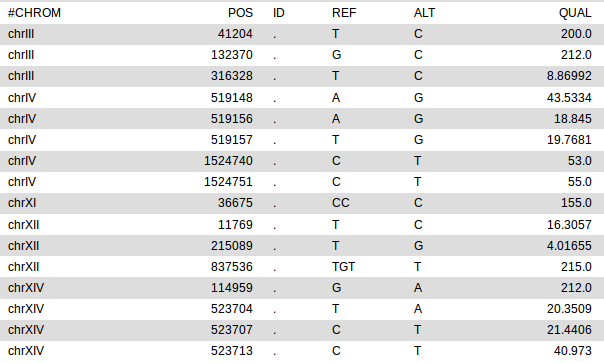
Applying this filter leaves us with only 16 variants (out of the initial 27000)! The list (produced in Galaxy) is shown below.
Q3: Differences between the evolved strain IMW005 and its parent CEN.PK113-7D
This question can, of course, be answered by just slightly modifying our last filter settings to:
mimodd vcf-filter example2_extracted_variants.vcf -o example2_q3_variants.vcf -s CEN.PK113-7D IMW005 IMW004 --gt 0/0 1/1 0/0 --dp 3 3 3 --gq 0 0 0
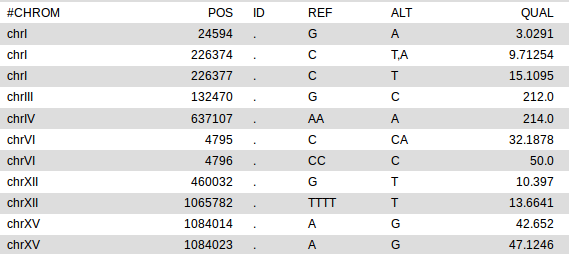
With the roles of IWM005 and IMW004 reverted, we get the following list of 11 variants:
Q4: Differences with common effects in IMW004 and IMW005
This question, asking for distinct variants in IMW004 and IMW005 that have a common effect on a genomic feature, is the most challenging one.
In this example, with the small number of variants obtained as answers to questions 2 and 3, it is not too difficult to find the two variants - one in IMW004, the other in IMW005 - that are in suspiciously close genomic vicinity, i.e., may well affect the same gene.
Nevertheless, we will demonstrate here how the annotate tool can help to identify these variants.
As part of the first example, we have looked at the most basic functionality of the tool, which is to turn a vcf file into a stripped down tabular report file.
But, annotate can do far more than this.
If you choose HTML as the output format instead of Tab-separated plain text, the tool will try to enrich the output with two types of hyperlinks, one for genomic positions and one for affected transcripts. These hyperlinks enable the user to access the relevant genomic region through the native genome browser for the organism of interest and to navigate to the corresponding gene page of the organism’s standard database, respectively.
The current version of MiModD comes with built-in support for generating such hyperlinks for the following six model organisms:
- the cyanobacterium Synechocystis PCC6803
- baker’s yeast (S. cerevisiae)
- thale cress (A. thaliana)
- the roundworm C. elegans
- the fruitfly D. melanogaster
- zebrafish (D. rerio)
For these species, it is enough to provide annotate with the species name (several aliases are supported) to have the hyperlinks generated.
If you are working with a different species you can provide your own template file with hyperlink formatting instructions.
Note
Weblinks are changing frequently and it is entirely possible that hyperlinks for your species of interest suddenly stop working. Custom template files offer a temporary solution for this kind of problem until we provide a software update.
If you discover broken hyperlinks or generate a template file that you want to share with a larger community, you should contact us and we will be more than happy to fix the problem or to add your organism to the list of natively supported species.
Enhancing variant annotations through genome browser hyperlinks
Generating hyperlinks to genome browser views of genomic regions has no requirements other than a valid hyperlink template or built-in species support. For our example, we can generate an annotated file from Galaxy by configuring the Variant Annotation tool as shown below (the input file here is the list of IMW005-specific variants generated as answer to Q3):
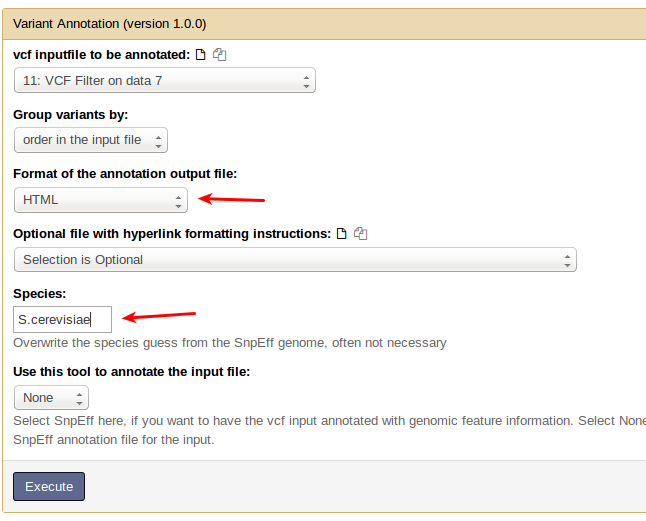
All you have to do is to set the output format to HTML and to provide the species name.
The command line equivalent of this Galaxy job is:
mimodd annotate example2_q3_variants.vcf --species S.cerevisiae -o example2_q3_anno.html -f html
The result of this step is a new dataset the contents of which can be viewed in any web browser (or by clicking on its eye symbol in Galaxy).
It should look like this:
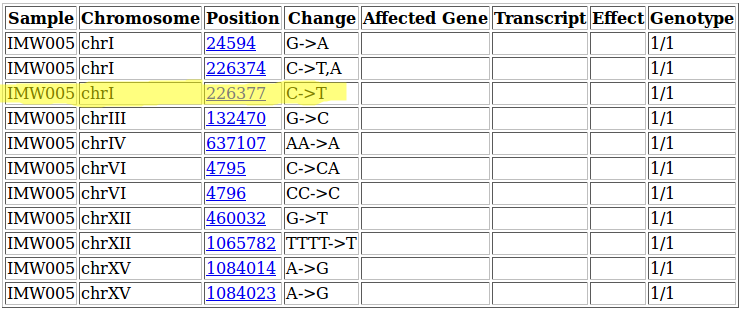
Following any of the position links will take you to the yeastgenome.org genome browser and will zoom in on a 1kb region around the variant site.
For the highlighted variant, for example, this would look like this:
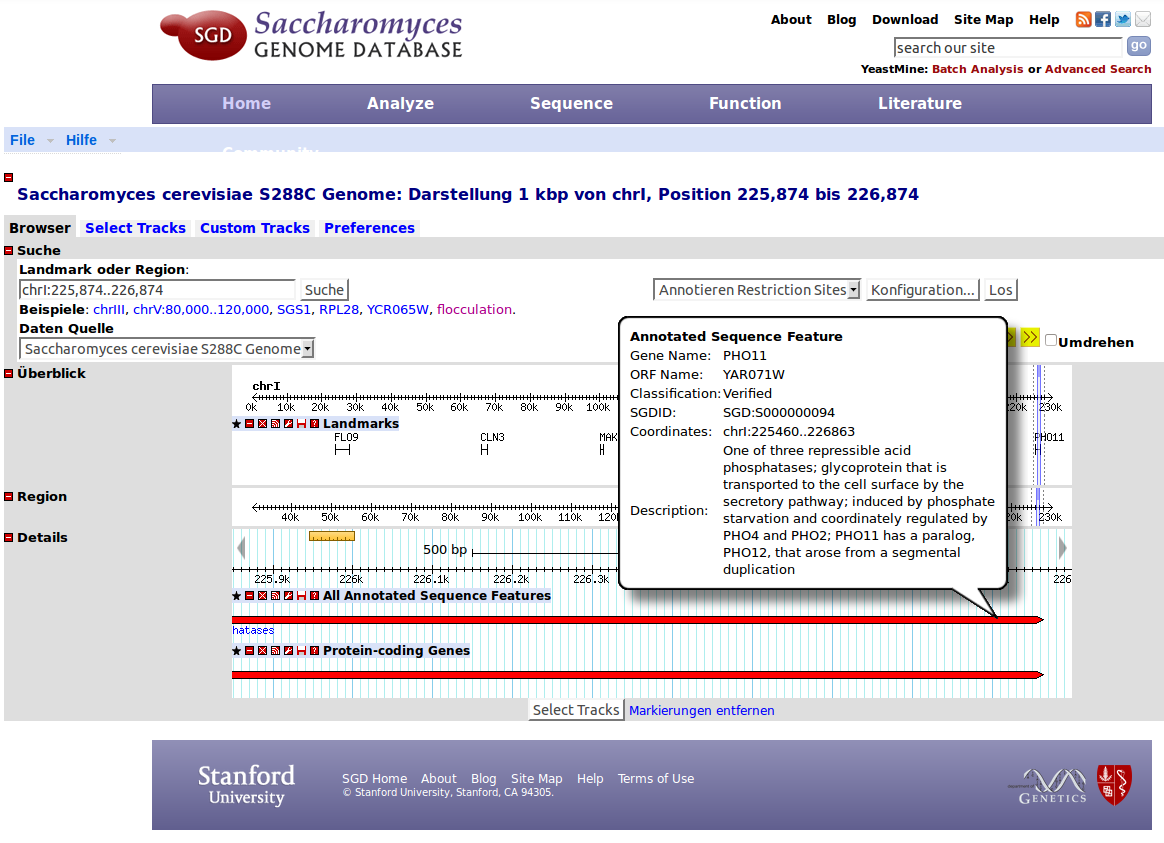
quickly showing that this variant lies in the gene PHO11.
Warning
If the version of the reference genome you are using is different from that used by the genome browser, the simple 1:1 mapping between variant sites reported by MiModD and positions shown in the genome browser may be inaccurate !
Make sure you are using a compatible genome version for your organism and do not rely on the genome browser view alone to determine the exact location of variations !
Including effects on genomic features in annotated reports
To annotate variants with their effects on genomic features, such as transcripts and genes, MiModD relies on SnpEff - a toolbox for genetic variant annotation and effect prediction.
The MiModD installation instructions have a separate section on the Installation and inital setup of SnpEff :doc:<install_snpeff>.
If you have configured MiModD to use SnpEff and you have a SnpEff genome file for yeast installed (genome file EF3.64 is assumed here), you can get fully annotated html output via the following command line:
mimodd annotate example2_q3_variants.vcf --genome EF3.64 --ud 500 -o example2_q3_anno_full.html -f html
, where the SnpEff genome file gets passed to the tool with the --genome
option (which also instructs the tool to use SnpEff for the annotations).
In addition, the example uses the --ud switch to restrict the length of
what is considered by SnpEff to be the upstream/downstream regions of genes.
This is one way to reduce the output of the tool.
Hint
The genome name following --genome option is the SnpEff genome file
name (which you used for downloading the file) and could be different for
your installation (e.g., if you chose to download a different version).
If you do not know or do not remember the name of the genome file you can use the simple snpeff-genomes tool like this:
mimodd snpeff-genomes
to get a list of all currently installed SnpEff genome files on your system together with organism names.
In Galaxy, SnpEff-dependent annotation jobs require one additional step: you have to generate a text file with the information about the installed SnpEff genome files on your system.
This can be done using the List Installed SnpEff Genomes tool to generate the list of genome files and store them in a dataset in your history. The tool does not require any parameters, but only has to be executed to get the dataset that you will need in the next step.
Going back to the Variant Annotation tool you can now configure its interface like below:
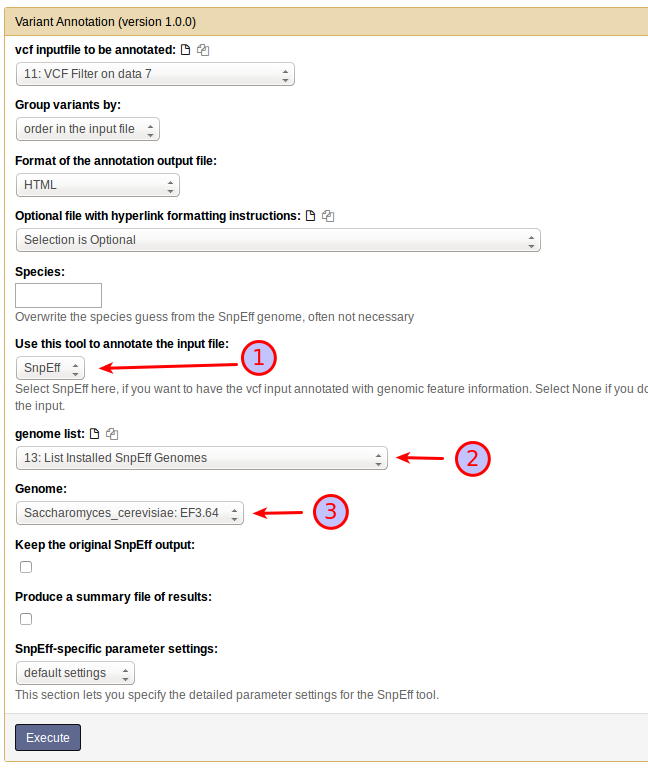
Essentially, you select (1) SnpEff as the tool to annotate the input file, which brings up the SnpEff-specific part of the interface. Next, you have to select a dataset from your history that holds the SnpEff genome list (2) . This is the dataset you just generated in the last step. Once selected, the content of the dataset is used to populate a drop-down menu that lets you select a SnpEff genome file (3). To generate equivalent output to the command line above, make sure you restrict the upstream/downstream interval length to 500 bases (4) .
Note
When MiModD uses SnpEff to annotate variants, you will usually not have to set the species explicitly since MiModD can obtain it from the SnpEff genome file.
If auto-detection of the species fails (resulting in no hyperlinks) or if
you want to override its result you can, however, provide a species name
explicitly through the Species text box or using the --species option
on the command line.